


Momitalk: Pregnancy Ultrasound
4.936.00 Reviews
App Specs
- Version
- 2.92.0
- Updated On
- License
- Free
- Downloads
- 100,000+
- Developer
- Humanscape, Inc.
- Categories
- Medical
- Platform
- Android, iOS
Screenshots



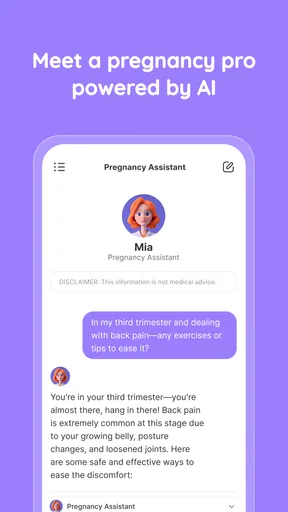
 Analysis by AppCompare
When I judge a pregnancy app, I care less about how much it promises to do and more about whether it fits into an already busy, emotional routine. Momitalk: Pregnancy Ultrasound is built around following a pregnancy week by week, recording personal moments and connecting with other expectant parents. That makes it a more personal companion than a medical reference app, though I would keep that distinction clear: its visuals and updates can make the experience easier to picture, but they are not a way to assess a baby’s health.
The app is free to download, with in-app purchases ranging from $0.99 to $39.99 per item. Its Everyone age rating makes it accessible to a broad audience, while its Medical category reflects the pregnancy-related subject matter rather than turning it into a clinical tool. Humanscape, Inc. is the developer. The app has a 4.9 average from around 12,000 ratings and over 100,000 installs, which suggests that many people have found a reason to keep it in their pregnancy routine.
What to expect from its pace and setup
Pregnancy apps often work best when checking them feels quick rather than like another task. In my experience, Momitalk’s appeal is its straightforward organization: the weekly journey, journal and community give you clear reasons to open it without making you hunt through a complicated dashboard. The initial setup asks for a due date so that the pregnancy timeline can be tailored to you. It is worth entering that carefully, because week-specific information is only useful when the timeline reflects your situation.
That does not mean every part of the app will feel equally quick. A short check of the weekly update is a different kind of use from spending time with the ultrasound simulation or reading community conversations. I would treat the first as a small routine and the latter as activities for when you have a few minutes to focus. The app is most useful when you decide what you came to do before opening it: check the current stage, save a thought, or browse for peer perspectives.
Getting Started with Momitalk
Jumping into Momitalk: Pregnancy Ultrasound is like stepping into a cozy space designed just for you and your growing baby. The setup process is incredibly intuitive. Right from the get-go, the app asks for your due date, which is essential for tailoring the experience to your pregnancy timeline.
Once you’re all set up, the app opens up a world of features. The design is clean and user-friendly, with everything neatly organized. Trust me, you won’t be fumbling around trying to figure out where things are.
Using the features thoughtfully
One practical way to get more from the timeline is to pair each weekly visit with one small action rather than trying to document everything. After reading the update, I might add a short journal note about a question I want to raise at my next appointment. That turns the journal into a useful memory aid: it can help me remember what I noticed, without pretending to replace a clinician’s notes or medical records.
Worth Reading Before You Choose

EA SPORTS FC Mobile 26 Is a Bigger Football Game, but It Takes Time

Flipboard Shows What News Apps Must Do Beyond the Feed

Switching to Android Auto Means Rethinking Your Driving Routine

Google Calendar Makes a Crowded Week Easier to Manage

Ludo King Makes the Most of the Minutes Between Plans

Baby Panda World Brings Quick Play to Modern Phones, but Its Game Library Feels Busy
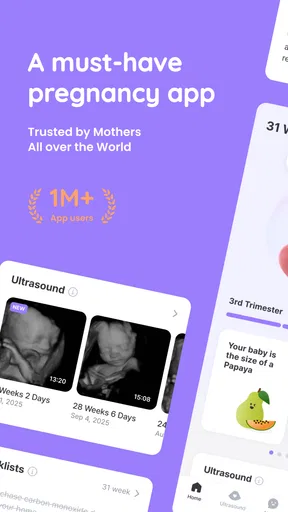
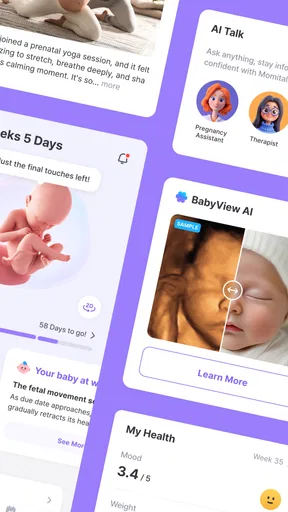
The ultrasound simulation is best approached as an illustration, not a scan. Its value is emotional and educational: it offers a visual way to think about development, while a real ultrasound and a healthcare professional remain the right sources for individual medical information. If you are prone to comparing images or interpreting every detail literally, this feature may be less reassuring than the app’s warm presentation suggests. I would enjoy it as a visual companion and leave diagnosis to the people responsible for your care.
Key Features
One of the standout features is the ultrasound simulation. Now, before you get too excited, it’s not a replacement for your regular doctor visits, but it’s a fun way to visualize your baby’s development week by week. It gives you a virtual peek into the womb, showing you what your baby might look like at each stage. It’s these little touches that make the app feel personal and engaging.
Another great feature is the journal. This is your personal space to jot down thoughts, feelings, and milestones. Whether it’s your first kick or a funny craving, keeping track of these moments is a wonderful way to look back on your pregnancy journey.
A useful journal habit is to write in a consistent, simple format: what happened, when you noticed it, and what you want to remember. You do not need to turn it into a polished account. A note made after an appointment, a new symptom to mention to your care team, or a moment you want to share later can be enough. I would avoid relying on a personal journal as the only place for information that needs to be shared with a clinician; use it to prompt a conversation, not to replace one.
Let’s not forget the community aspect. The app connects you with other soon-to-be parents, offering a platform to share tips, ask questions, and offer support. It’s like a coffee group, but digital!
Community, comparison and everyday use
Community can be especially helpful when you want to hear how other people handle the ordinary parts of pregnancy: preparing for a busy week, remembering questions for an appointment, or making sense of a new stage. I find peer conversation most useful as company and perspective, not as personalized advice. Two pregnancies can differ, and a confident comment from another user is not the same as guidance from your own healthcare provider. If a discussion makes you more worried rather than supported, it is reasonable to step away and use the app for its journal or weekly material instead.
A realistic routine might look like this: on a commute or during a quiet moment at home, you check the current week’s update; later, after an appointment or a conversation with family, you add a short journal entry; at the weekend, you browse the community if you want to compare experiences. Keeping those activities separate can make the app feel manageable. It also prevents a common trap of pregnancy tracking: turning every spare moment into another check of something you cannot control.
For a partner or relative, the app may offer a simple way to follow the timeline and share in the anticipation, but the most personal material belongs to the person using it. I would not assume that every family member needs access to a journal or every detail. A better approach is to choose together what to share, and to use the app as a conversation starter rather than expecting it to coordinate everyone’s care.
How it fits alongside other pregnancy tools
Compared with a plain calendar or notes app, Momitalk brings pregnancy timing, visual development content and peer conversation into one pregnancy-focused place. A calendar is still better for appointment logistics, reminders and household planning; a notes app may be better if you want a private, flexible record without a community element. A pregnancy book or trusted health resource is a better fit when you want carefully structured reference material, while your clinician is the right source for personal medical decisions.
That makes the choice less about finding one app that does everything and more about deciding which parts of the experience you want to keep together. If the visual timeline and shared community are what you will actually use, having them close to the journal is convenient. If you mainly need appointment organization, symptom tracking for a clinician, or a private archive, your existing tools may do that job more directly. I would not move sensitive or medically important records into a new app simply for the sake of having one dashboard.
Personal Experience
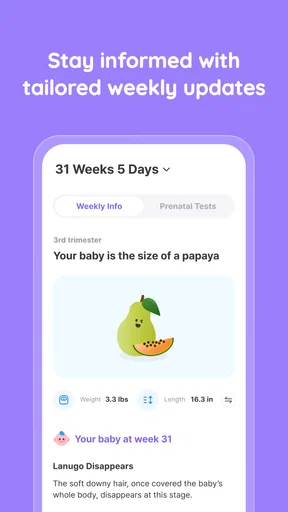
Using the app has been a delightful experience. I found the weekly updates particularly helpful. The app sends you little nuggets of information about your baby’s development, tailored to your specific week of pregnancy. It’s like having a pregnancy book at your fingertips, but more interactive.
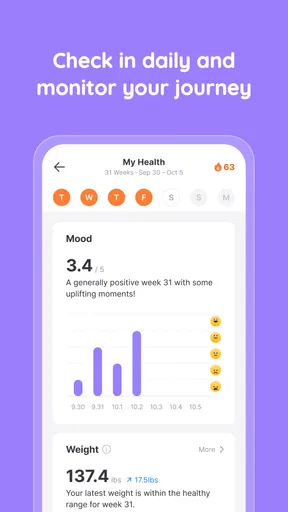
One of my favorite things is how the app integrates with other health apps. It pulls in data from fitness trackers, allowing you to keep an eye on your health stats. You can track your weight, activity levels, and other essential health metrics all in one place. It’s a comprehensive solution for anyone who wants to keep everything organized.
Reliability, busy moments and device fit
For reliability, I would judge the app by whether it can support a routine without becoming the routine. A pregnancy timeline, a saved note and a community visit serve different purposes, so it helps to use each deliberately rather than expecting one feature to cover everything. If you are using it to remember a question for an appointment, write that question in a way you can recognize later and keep any urgent concern in the appropriate channel for medical care.
Heavy-use moments are likely to be the times when several parts of pregnancy life meet: reading an update, looking at the simulation, then switching to the journal or a conversation with other parents. That is when the app has the most emotional value, but it is also when it can become distracting. I would not treat a long browse through other people’s experiences as a substitute for getting a clear answer about a personal concern. The best recovery from an unhelpful browsing session is simple: close the community, save any useful question, and return to a trusted care contact if the issue needs medical attention.
On device fit, the app’s current version is 2.92.0 and it supports Android 7.0 or later. That makes it an option for people who do not have the newest Android device, though a phone’s available storage, operating condition and connection can still affect the general experience. I would keep the app updated when practical, especially if a feature behaves unexpectedly, and avoid assuming that a slow or unstable moment means your pregnancy information has been lost. For anything you consider important to preserve, a separate personal record is a sensible backup habit.
Speed and stability are hard to judge in isolation because they depend on the phone and connection as well as the app. The most useful expectation is modest: quick weekly checks should be easier to fit into the day than extended browsing, and community content may be more variable because it involves other people’s posts. If an image or page takes longer than you want, there is no need to keep reopening it; move to the task you came for and try again later. I value that kind of low-pressure use more than a promise that every screen will feel instant on every device.
Who will get the most from it
I think Momitalk suits someone who wants pregnancy to feel documented and shared, not just scheduled. It is particularly appealing if you enjoy seeing a week-by-week visual, like keeping personal notes, and find reassurance in hearing from people at a similar stage. It can also work for a first-time parent who wants a gentle way to follow the timeline while building a list of questions for appointments.
It is less suitable if your main need is a clinical tracker, a private medical record, or a tightly organized appointment manager. Someone who prefers not to read peer experiences may also find the community unnecessary. In those cases, a clinician’s guidance, a dedicated calendar or a private notes tool will be a better primary resource; Momitalk can still be an optional companion, but there is no need to make it the center of your pregnancy planning.
Final Thoughts
Wrapping it up, Momitalk: Pregnancy Ultrasound is a gem for anyone on the pregnancy journey. It combines practicality with a touch of fun, making it a delightful companion from start to finish. The app doesn’t just keep you informed, it also provides a sense of community and support, which is invaluable during such a significant life change.
If you’re looking for a way to enhance your pregnancy experience, I’d say give this app a try. It’s like having a little pregnancy guru in your pocket, ready to assist you every step of the way. So, go ahead and download it to see for yourself—you might just fall in love with it as I did!
Overall, I see it as a supportive sidekick rather than a must-have health tool. Its strongest case is the combination of a pregnancy-specific timeline, a place to keep memories and a community that can make the process feel less solitary. Its limits matter just as much: the simulation is not medical imaging, peer discussion is not personal care, and a journal is not a formal record. Used with those boundaries in mind, it can add a thoughtful rhythm to the weeks without asking you to hand over every part of the experience to an app.
My performance verdict
In practical terms, the app’s performance matters most when it stays out of the way: opening for a brief weekly check, saving a note before it slips your mind, or returning to a conversation when you have time. I would not choose it on the assumption that it replaces a calendar, medical resource or private archive. I would choose it if I wanted a pregnancy-focused space that mixes visual context with personal reflection and peer connection.
Pros
- User-friendly interface for easy navigation.
- Accurate tracking of pregnancy milestones.
- Customizable reminders for appointments.
- Interactive educational content for parents.
- Secure data storage and privacy protection.
Cons
- Limited features in the free version.
- Requires internet for full functionality.
- Occasional ads in the free version.
- Some features may be redundant for experienced parents.
- Limited language options available.
FAQs for Momitalk: Pregnancy Ultrasound
What features does Momitalk: Pregnancy Ultrasound offer?
Momitalk: Pregnancy Ultrasound provides a unique experience by simulating ultrasound images for expectant parents. It includes features such as a realistic ultrasound simulation, customizable baby images, and weekly pregnancy updates. Users can also access educational content about fetal development and track their pregnancy milestones.
How accurate is the ultrasound simulation in the app?
While Momitalk offers a visually appealing simulation, it is important to note that it is purely for entertainment purposes. The app does not replace professional medical ultrasounds. It provides a fun way to visualize fetal development but should not be used for medical diagnostics or decision-making.
Is Momitalk: Pregnancy Ultrasound free to download?
The app is free to download, but it offers in-app purchases and premium features that enhance the user experience. These may include additional customization options or exclusive content. Users can choose to enjoy the basic features at no cost or purchase extras for a more personalized experience.
Can I use Momitalk to track my pregnancy progress?
Yes, the app offers a feature to track pregnancy progress through weekly updates and milestones. Users can input data to receive personalized growth insights and educational content about each stage of pregnancy. This makes it a valuable companion for expectant parents wanting to stay informed.
Is Momitalk: Pregnancy Ultrasound available for both Android and iOS?
Yes, Momitalk is available for download on both Android and iOS platforms. This ensures a wide range of users can access its features regardless of their device preference. Links to the app are typically available through the respective app stores or the developer’s website.


